

Skip to content
FXWare Powered by Orbex
FXWARE METATRADER TOOLS · MT4 & MT5

A clearer view of the market. Less manual chart work.

Market Scanner brings multiple markets and timeframes into one dashboard. Fibo Manager plots levels automatically, while ScalpingAI combines Range Bars, trend, signals and Fibo on one chart. The package is available at no extra charge when the Orbex account is eligible under the offer and meets its current terms.

After you submit the form, a representative of Orbex Services LTD will contact you about the package.

LESS MANUAL CHART WORK
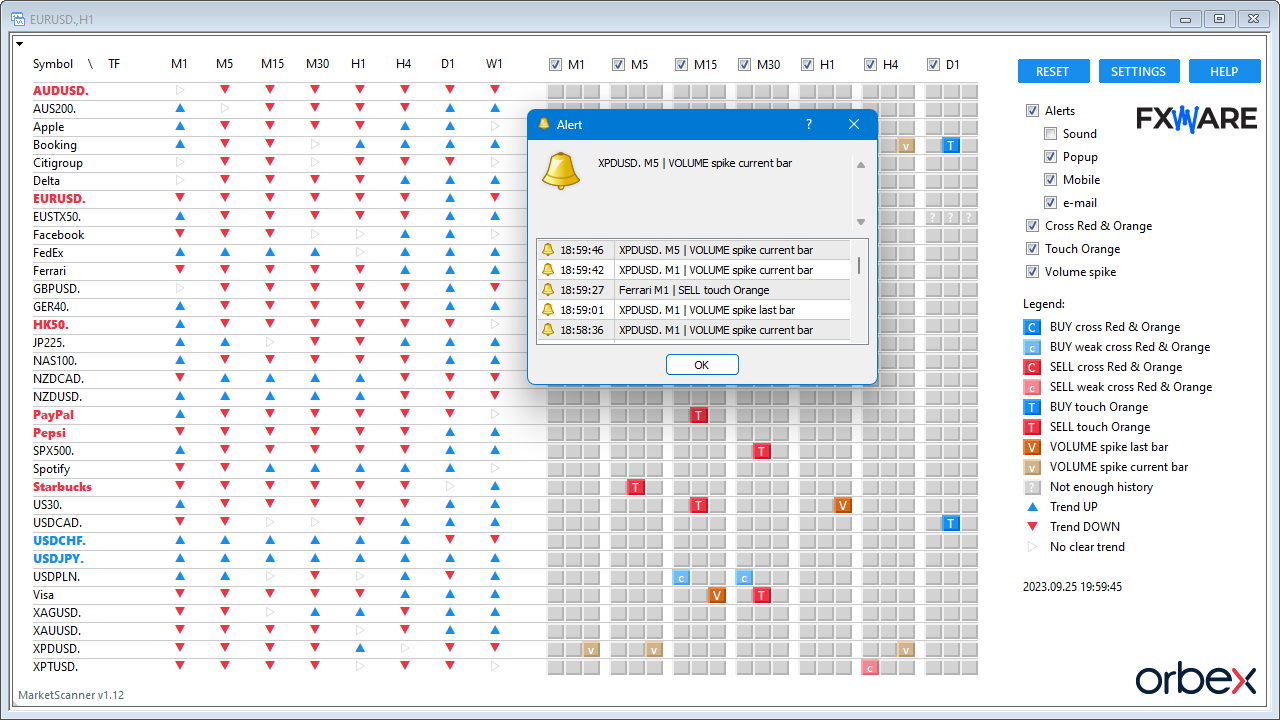
Market Scanner in MetaTrader showing symbols, timeframes, trends, signals, and an alert popup.
01Market Scanner
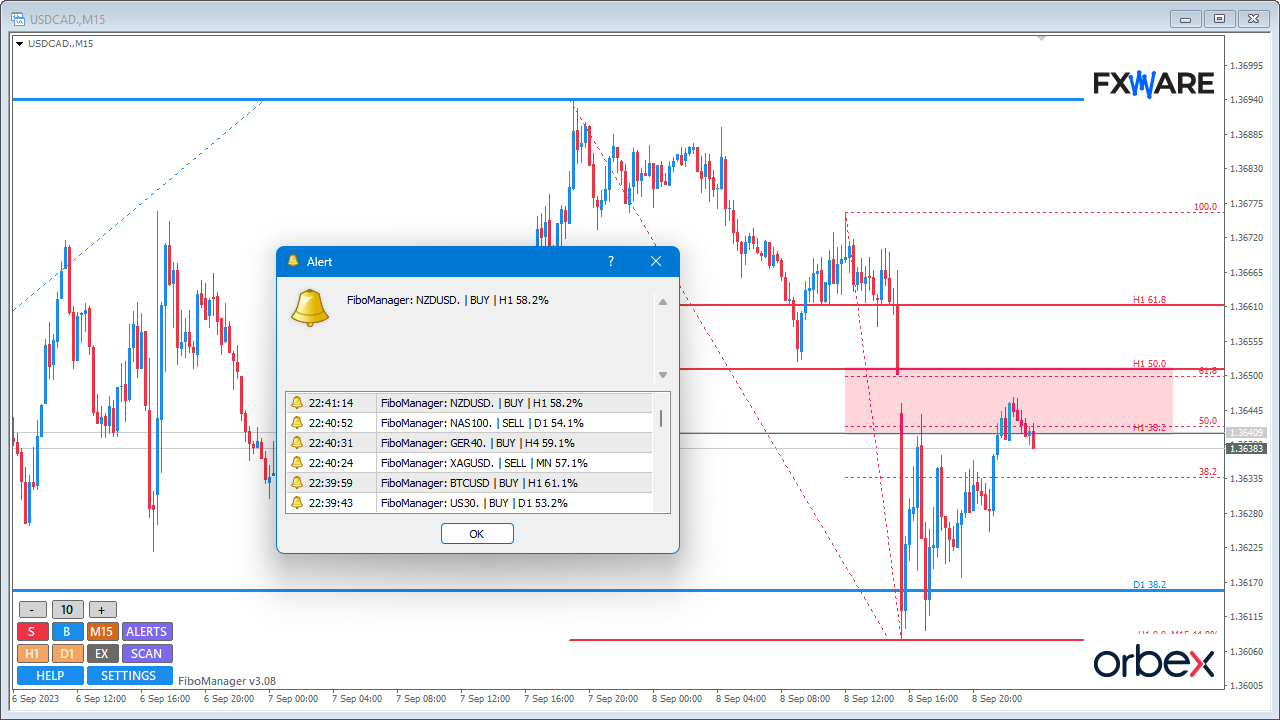
MetaTrader chart with automatically plotted Fibonacci levels and zones, plus an alert popup.
02Fibo Manager
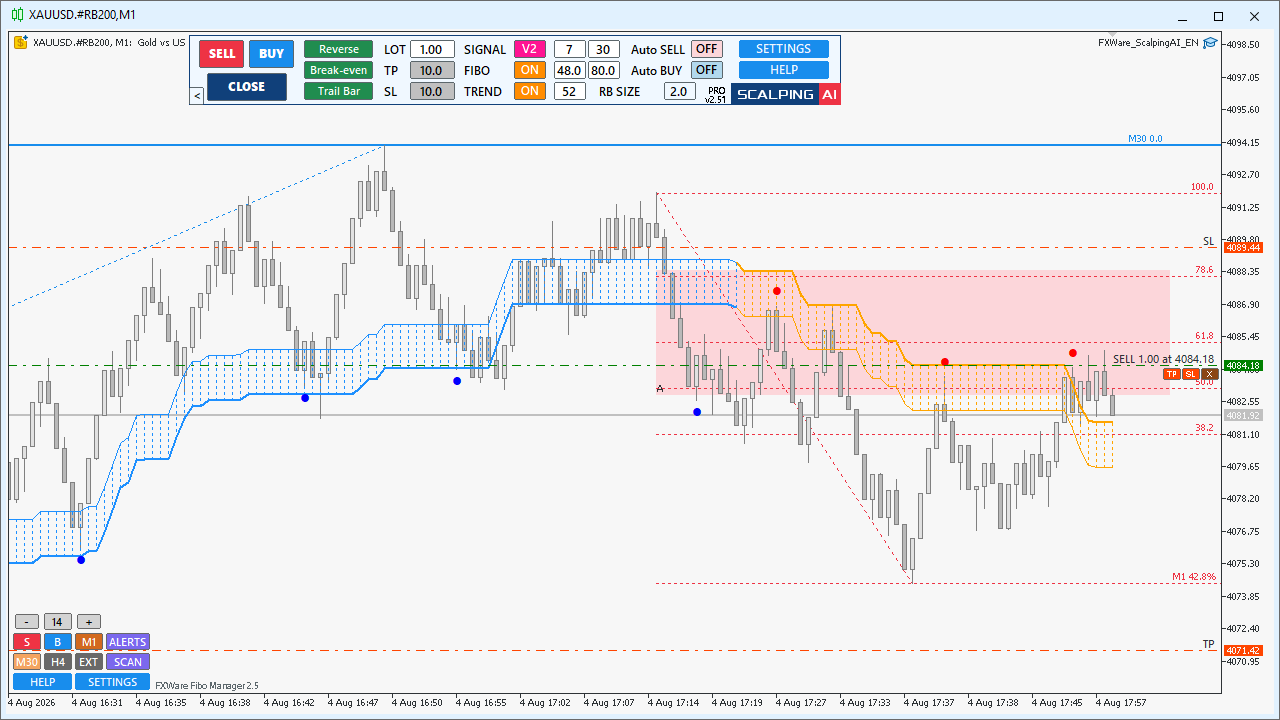
MetaTrader ScalpingAI chart with Range Bars, blue and orange trend zones, Fibonacci levels, and a control panel with English labels.
03ScalpingAI
  • 3tools in one package
  • MT4 + MT5versions for both platforms
  • NO EXTRA CHARGEfor eligible accounts that meet the offer terms

Each tool automates a different part of your chart work.

Market Scanner brings markets together, Fibo Manager plots levels, and ScalpingAI organises the analysis of short-term price moves.

01Market Scanner

Start with a market scan

Compare markets and timeframes in one panel.

Instead of opening charts one by one, review symbols, trend information and signals in one dashboard. From there, open the chart you want to analyse in more detail.

  • multiple symbols and timeframes in one panel
  • trend and signal information arranged for comparison
  • alerts for selected signals
Market Scanner 1280 × 720
02Fibo Manager

Plot levels automatically

View Fibonacci levels without drawing every grid by hand.

Fibo Manager plots levels from price moves, shows potential reaction areas and adds higher-timeframe information to the current chart.

  • Fibonacci levels plotted automatically
  • potential reaction areas shown on the chart
  • higher-timeframe information in the current view
Fibo Manager 1280 × 720
03ScalpingAI

Review short-term price moves

Keep Range Bars, trend, signals and Fibo in one view.

ScalpingAI creates a Range Bar chart and adds trend, signal and Fibonacci information. The key elements used to review short-term price moves stay on one chart.

  • short-term price moves shown on Range Bars
  • trend, signals and Fibo levels on one chart
  • controls for managing the chart view
ScalpingAI 1280 × 720

Talk about access to the package.

The package is available at no extra charge to Orbex clients whose accounts are eligible under the offer and meet its current terms. Ask about the package access terms.

  1. 1

    Request contact

    Use the form to request contact from Orbex Services LTD about the package. PROMETHAI will record and forward your request.

  2. 2

    Find out the access terms

    A representative of Orbex Services LTD will discuss package availability or help with your existing access. Orbex confirms account eligibility for the offer.

  3. 3

    Download the installer

    The download link is available without the form. Downloading the installer alone does not grant access to the tools.

Talk about the package.

After you submit the form, a representative of Orbex Services LTD will contact you about package availability or help with your existing access.

Who handles your request?

PROMETHAI sp. z o.o. operates the website, records your request and shares the details needed for contact with Orbex Services LTD.

A representative of Orbex Services LTD contacts you about package availability and use. Submitting the form does not open an account or grant access to the tools.

Enter the details for your selected contact channel with Orbex Services LTD.
This is your preference, not a booked appointment.
PROMETHAI sp. z o.o. records your request and shares the necessary details with Orbex Services LTD. You choose one contact channel. Both marketing consents are optional.

Questions before you launch the package

Is there a separate charge for the package?

There is no separate charge when the Orbex account is eligible under the offer and meets its current terms. Orbex confirms account eligibility for the offer.

My access has already been arranged. Do I need to submit the form again?

No. Download the installer without submitting your details again. You can still use the form to request contact from Orbex Services LTD again.

Can I download the tools without the form?

Yes. The download link is available without the form. Downloading the package does not launch the tools - access depends on meeting the offer terms.

What will the Orbex Services LTD representative discuss with me?

A representative of Orbex Services LTD will answer questions about package availability or help with your existing access and discuss the offer terms. Your request is for contact about the package; it does not confirm that access has been granted.

Who decides on financial service availability and account eligibility?

The financial service provider makes that decision, taking into account the client's country and the applicable rules. An account agreement is separate from a request about the package. PROMETHAI presents the tools and forwards the contact request to Orbex Services LTD; it does not decide whether the broker accepts a client.

Ask about access or download the installer.

Risk warning: Trading foreign exchange on margin carries a high level of risk and may not be suitable for all investors. Before deciding to trade, carefully consider your investment objectives, experience and risk appetite. You may sustain a partial or total loss of invested funds, so do not trade with money you cannot afford to lose. Make sure you understand the risks involved and seek independent financial advice if needed. Orbex does not offer services to residents of certain jurisdictions, including the United States, Iran, North Korea, Mauritius and Romania.